Remote desktop for macOS
A Microsoft Remote Desktop alternative for Mac
Microsoft renamed its Mac “Remote Desktop” app to Windows App. It is still free and still the simplest choice for pure RDP. But if you also live in a terminal, Noden is a native macOS RDP client — clipboard and file copy both ways, shared folders, RD Gateway — with your SSH and SFTP sessions in the same window.
Published July 28, 2026 · By Tugay Pala, Useroam Teknoloji
Should you switch from Microsoft's app?
Honest answer: if all you do is open a Windows desktop occasionally, Microsoft's Windows App (the former Microsoft Remote Desktop) is free, well-maintained and hard to beat for that one job. You do not need an alternative for pure RDP. The reason to use something else is when RDP is only part of your day — when you also SSH into Linux boxes and move files over SFTP, and switching between three apps is the actual annoyance.
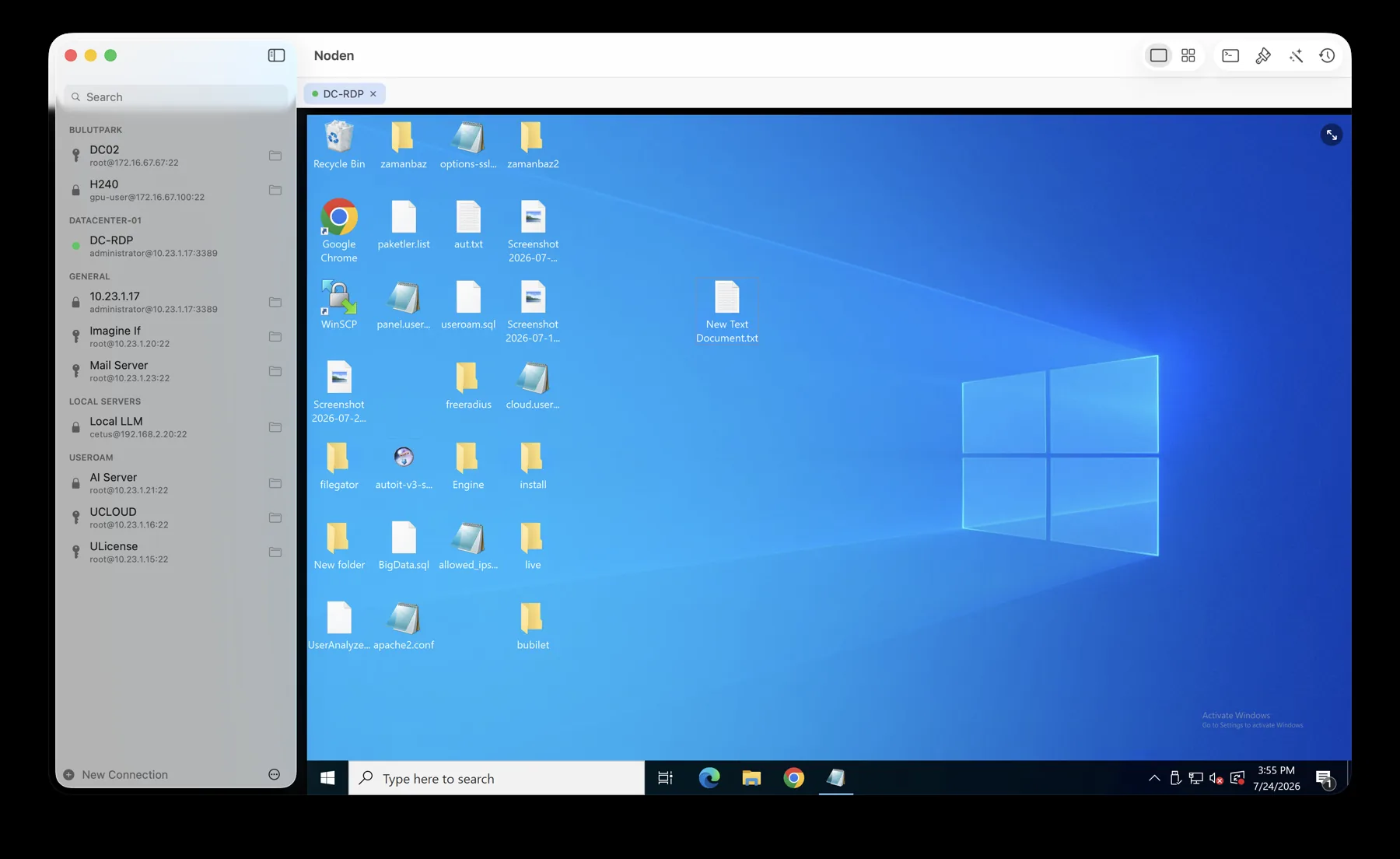
What Noden's RDP gives you
- Dynamic resolution — the Windows desktop follows the window as you resize it, no black bars.
- Clipboard and files, both directions — copy in Finder, paste in Windows Explorer, and back again.
- Shared folders — a Mac folder appears inside Windows under “This PC” for large transfers.
- RD Gateway, admin/console session, auto-reconnect, colour-depth control and a credential prompt.
- Same window as SSH and SFTP — a Windows desktop and three Linux terminals side by side in a grid.
- Credentials in the macOS Keychain, never on our servers. No account required.
The alternatives, honestly compared
| Noden | Windows App (Microsoft) | Royal TSX | Jump Desktop | |
|---|---|---|---|---|
| RDP to Windows | Yes | Yes | Yes | Yes |
| SSH terminal | Yes | No | Yes | No |
| SFTP file manager | Yes — dual-pane | No | Yes | No |
| Clipboard + file copy both ways | Yes | Yes | Yes | Yes |
| RD Gateway | Yes | Yes | Yes | Partial |
| Terminal + desktop side by side | Yes | No | Tabs | No |
| Price | Free up to 5; Pro USD 5.99 first yr, then 10.99/yr | Free | Paid license | Paid / subscription |
| Credential vault | Noden: RDP passwords can come from the built-in vault — macOS Keychain, device-only, unlocked by Touch ID — so rotating a secret once updates every connection that uses it. Windows App: credentials are saved per connection. Source: credential storage compared, read from each vendor's own documentation. |
Details from each vendor's public materials, July 2026; verify current features before deciding.
Choose Windows App for free, pure RDP. Choose Royal TSX if you manage a very large inventory of mixed connections across Mac and Windows. Choose Jump Desktop if you want RDP plus its own fluid remote-control protocol. Choose Noden if RDP sits next to SSH and SFTP in your day and you want all three in one Mac window, for USD 5.99 your first year (then USD 10.99) with RDP free to try.
Frequently asked
What replaced Microsoft Remote Desktop on Mac?
Microsoft renamed the app to Windows App. It is still free and still the simplest option for pure RDP. Noden, Royal TSX and Jump Desktop are third-party alternatives.
Is there a free alternative?
Yes. Noden includes RDP in its free tier (up to five saved connections of any type), with clipboard and file copy both ways, shared folders and RD Gateway.
Which Windows versions work?
Any Windows machine with Remote Desktop enabled — Windows 10 and 11 Pro, and Windows Server editions, including through a Remote Desktop Gateway.
When you should keep using Microsoft's client
- Your organisation manages remote desktops centrally through Microsoft's tooling and workspace feeds. Noden connects to hosts you configure yourself.
- Windows is the only thing you connect to. Noden's argument is that RDP sits next to your SSH sessions — with no Linux servers, that argument disappears.
- You need it on iPad or Windows. Noden is a macOS 13+ application only.
Troubleshooting
Remote Desktop is enabled but the connection is refused
Confirm the port: setting Protocol to RDP moves the connection to 3389 automatically, so a custom port has to be set explicitly.
You need a domain login
Domain logins are supported. Enable Ask for credentials when connecting if you would rather be prompted than store the password, and you choose whether it goes into the Keychain.
Clipboard works but files do not
File copy-paste runs in both directions between Finder and Windows Explorer. For anything large, share a Mac folder into the session instead.
The link drops on an unstable network
Automatic reconnect is built in, and the session returns to the same tab.
Download Noden for Mac
Free to start, no account required.
brew install --cask useroamteknoloji/tap/noden
See also: RDP client for Mac · SSH, SFTP and RDP in one app · Royal TSX alternative · Serial console for Mac SSH to old switches · Best SSH client for Mac