Guide · updated 2026
Best SSH client for Mac (2026)
There is no single "best" SSH client — it depends on whether you want a quick command line, a powerful local terminal, or a graphical manager for many servers with file transfers. Here is an honest rundown of the main options on macOS, including where each one fits.
Disclosure: we are Useroam Teknoloji and we make Noden, which is number 3 on this list. That is a conflict of interest and you should read the page knowing it. What we have tried to do instead of pretending otherwise: name the tool that genuinely wins each category even when it is not ours, link every competitor to its own site so you can check the claims, and end with a section on where Noden is the wrong answer.
Published July 15, 2026 · Updated July 28, 2026 · By Tugay Pala, Useroam Teknoloji
1. Built-in Terminal + OpenSSH — best for quick access
macOS ships with ssh, scp and sftp. Free, always there, perfect for one-off connections. You manage everything by hand in ~/.ssh/config, and there's no graphical file browser.
2. iTerm2 — best local terminal emulator
iTerm2 is a superb, free terminal emulator with deep customization. It's ideal for local shell work; you still SSH by typing commands, and there's no built-in SFTP browser or saved-connection manager. See our iTerm2 for SSH notes.
3. Noden — best native SSH + SFTP client with AI
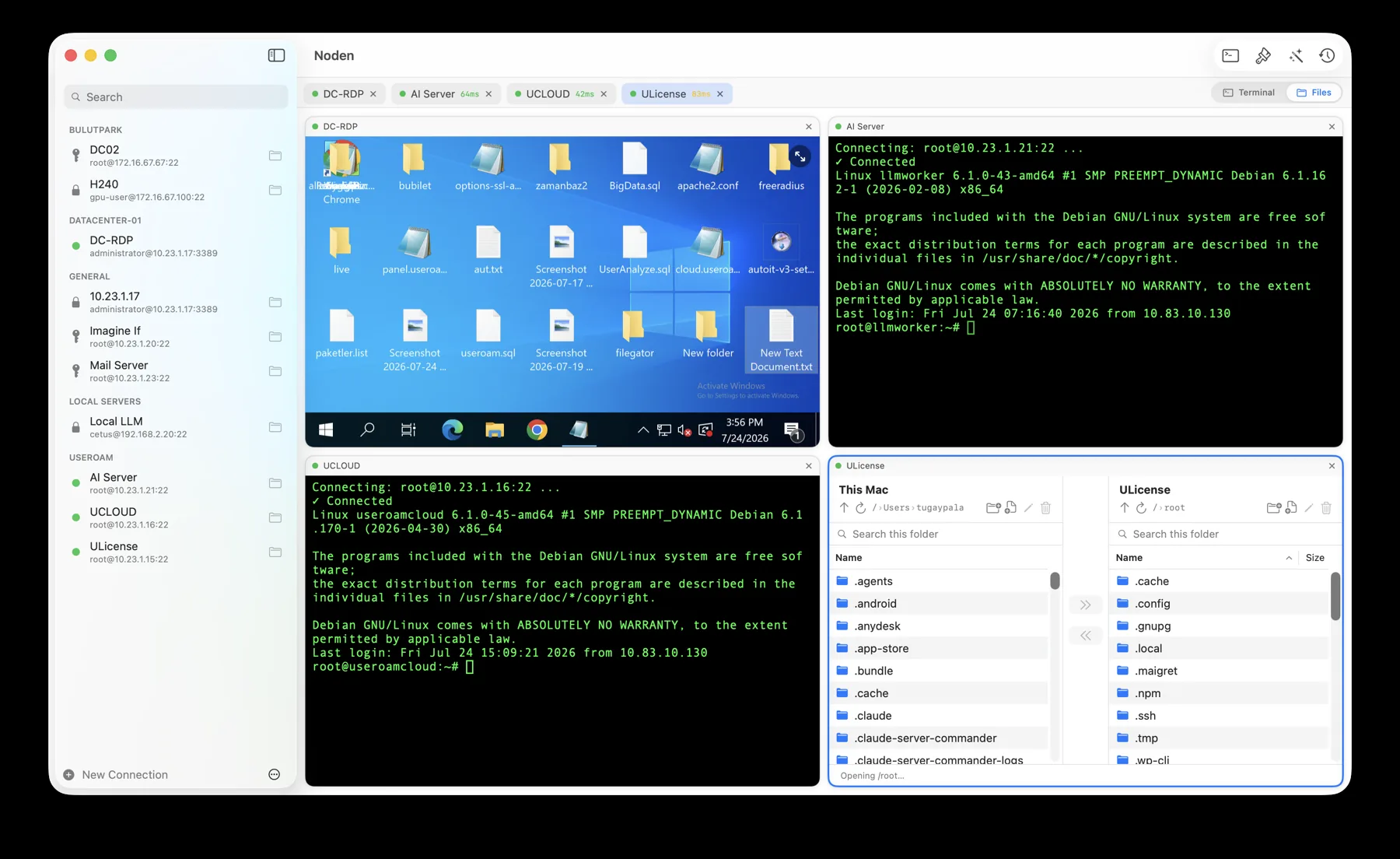
Noden is a native SwiftUI app built for managing servers: saved SSH connections, a grid to watch several live terminals at once, a dual-pane SFTP browser with drag-and-drop and remote editing, searchable per-host history, and an optional AI assistant that suggests commands and asks before running them. It imports ~/.ssh/config, uses your existing keys and stores secrets in the Keychain. Free for up to 5 connections; Pro is $5.99 your first year, then $10.99/year. Notarized, Apple Silicon + Intel, macOS 13+.
4. Termius — best for cross-platform sync
Termius runs on macOS, Windows, Linux and mobile with an account and optional cloud sync. Good if you need the same client everywhere; it's account-based rather than local-first. Compare on our Termius alternative page.
5. Royal TSX — best for many protocols
Royal TSX manages SSH, RDP, VNC and more in one app. Choose it if you need multiple remote protocols beyond SSH/SFTP. See the Royal TSX alternative page.
6. SSHive — SSH, SFTP, RDP and VNC, with iOS
SSHive is a native macOS, iPhone and iPad client covering SSH, SFTP, RDP, VNC and SSH tunnels. It is free for five saved profiles, and a one-time USD 9.99 Pro tier (launch price; list USD 19.99) unlocks RDP, VNC, broadcast mode and an MCP server that lets external AI agents run commands on your servers. A newer arrival in 2026 — pick it if you want SSH on your phone too, or need VNC. It has no serial console. See Noden vs SSHive.
7. Tempest — cross-platform, with Kubernetes and an AI agent
Tempest runs on macOS, iOS, Windows and Android and adds Mosh, serial and Kubernetes, plus real-time collaboration and Storm AI — an agent that plans and runs terminal tasks. It's a subscription, and best for platform engineers and teams. See Noden vs Tempest.
Quick recommendation
| Just need quick SSH | Built-in Terminal + ssh |
|---|---|
| Local terminal power | iTerm2 |
| Manage many servers + SFTP + AI, native | Noden |
| Same client on every OS | Termius |
| RDP/VNC + SSH in one app | Royal TSX |
| SSH on iPhone/iPad, or VNC | SSHive |
| Kubernetes, Mosh, team collaboration | Tempest |
| SSH, SFTP and RDP in one Mac window | Noden |
Where Noden is the wrong answer
Keeping ourselves honest, since we publish this list:
- You are not only on a Mac. Noden is a native macOS app and there is no Windows, Linux, iOS or Android client, and no browser version. If you need the same client on a phone or a PC, this is a hard stop — Termius exists for exactly that reason.
- You live in your local terminal. iTerm2's triggers, coprocesses, tmux integration and profile system are deeper than anything Noden offers for local work. Noden's ⌘T local terminal is for convenience, not a replacement.
- You need protocols we do not speak. There is no VNC, and no Kubernetes or container tooling. Royal TSX and Tempest cover those respectively.
- You need a shared team vault today. Noden's vault is per-Mac, in that Mac's Keychain. A shared team plan is not on sale yet, so if several people must hold the same credentials right now, this is not the tool.
- You are on macOS 12 or older. Noden requires macOS 13 Ventura or later.
When none of this matters
- You connect to one or two servers. The built-in
sshcommand with a~/.ssh/configentry beats every app on this page for that. - You are not on a Mac, or you are on macOS 12 or older. Everything compared here that involves Noden needs macOS 13 Ventura or later.
- You need one tool across Windows, Linux and macOS. That rules Noden out immediately — it is macOS-only.
Troubleshooting
You are moving from another client and do not want to retype hosts
If the servers are in ~/.ssh/config, Noden imports the file and creates a saved connection per Host entry.
You want to try before deciding
The free tier is not a trial — it keeps five saved connections, the terminal, SFTP, RDP and serial console indefinitely, with the last 50 commands of history.
You are comparing on price
Noden Pro is USD 5.99 your first year, then USD 10.99 per year for unlimited connections, full history and the AI assistant. Install from the DMG or with brew install --cask useroamteknoloji/tap/noden.
Install Noden on macOS
brew install --cask useroamteknoloji/tap/nodenFrequently asked questions
What is the best SSH client for Mac?
It depends on your workflow. Terminal + ssh for quick access, iTerm2 for a local terminal, Noden for a native graphical SSH/SFTP/RDP client with AI, Termius for cross-platform sync, Royal TSX for many protocols, SSHive if you also want iOS or VNC, and Tempest for Kubernetes and team collaboration.
Is there a free SSH client for Mac?
Yes. The built-in OpenSSH client and iTerm2 are free, and Noden has a free tier covering terminal and SFTP for up to five connections.
Which Mac SSH client has SFTP built in?
Noden includes a dual-pane SFTP browser in the same window as the terminal, with drag-and-drop and remote editing.
See also: Serial console for Mac · PuTTY for Mac · Mac SFTP client · MobaXterm alternative · Mac SSH client guide