FileZilla alternative for macOS
A native FileZilla alternative for Mac
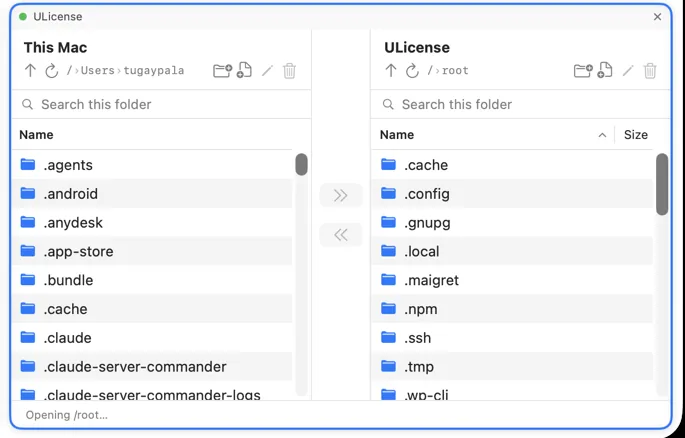
FileZilla is a well-known SFTP/FTP client, but many Mac users want something more native and focused. Noden is a native macOS SFTP client with a clean dual-pane browser, drag-and-drop transfers and remote file editing — plus a built-in SSH terminal in the same window, so files and commands live together.
Published July 16, 2026 · By Tugay Pala, Useroam Teknoloji
FileZilla and Noden at a glance
| Interface | Noden is a native SwiftUI Mac app; FileZilla is cross-platform (Qt). |
|---|---|
| Dual-pane transfers | Both offer local/remote panels with drag-and-drop. Noden keeps it simple and Mac-native. |
| Built-in terminal | Noden adds a full SSH terminal and a multi-session grid; FileZilla is file-transfer only. |
| Remote editing | Noden opens a remote file in a Mac editor and re-uploads on save. |
| Protocols | Noden focuses on SFTP over SSH. FileZilla also does plain FTP/FTPS if you need it. |
| Security | Noden uses your ~/.ssh keys and stores secrets in the macOS Keychain. |
Why choose Noden
If your transfers are over SSH/SFTP and you want a native, focused Mac app that also gives you a terminal, Noden fits. It's notarized, runs on Apple Silicon and Intel, and imports your existing SSH config and keys. Free for up to five connections; Pro is $5.99 your first year, then $10.99/year.
When FileZilla is the better fit
- You need plain FTP or FTPS. Noden only does SFTP over SSH — if the server has no SSH daemon, Noden cannot reach it at all.
- You transfer to servers you have no shell account on. Noden's file manager is attached to an SSH session, so file access and shell access come together.
- You want a cross-platform tool that behaves the same on Windows, Linux and macOS. Noden is macOS-only by design.
Moving from FileZilla: what carries over
The daily rhythm is the same — two panes, drag, edit, upload — with a few things that only make sense on a Mac.
- Your servers come with you. Noden imports the hosts in
~/.ssh/configand uses the Ed25519 and ECDSA keys already in~/.ssh, so there is no re-entering of connection details. - Credentials live in the macOS Keychain rather than in an application configuration file, and the built-in vault holds passwords, SSH private keys, API tokens and secure notes behind Touch ID. Nothing is written to a plain file, synced to iCloud or included in a Time Machine backup.
- Remote editing without a round trip. Open a remote file in your own editor; saving sends it back over the same connection.
- A terminal beside the files. The shell for the same server is one pane over,
so
chmod,tail -for restarting a service does not mean another app. Command history is searchable per host. - One app for the rest of the job. Windows machines over RDP and switch or firewall console ports over USB-to-serial appear as connections in the same sidebar. Serial is included in the free version.
- Native, not Electron. Noden is a Metal-rendered macOS app, so it launches and scrolls like the rest of your Mac.
The free version covers five saved connections with the terminal, the SFTP commander, RDP and serial console, plus 20 vault items — enough to see whether the workflow fits before paying for anything.
Troubleshooting
The server only offers FTP
There is nothing to configure — SFTP runs over SSH on port 22, and a pure FTP server will not answer. Ask for SSH access, or keep FileZilla for that host.
You want the two-pane layout you are used to
Every SSH connection already includes it: local Mac on one side, server on the other, with drag-and-drop in both directions and recursive folder copies.
Keyboard navigation feels unfamiliar
Arrow keys move the selection, Enter opens, Backspace goes up, ⌘R refreshes, and typing letters jumps to a matching name.
Install Noden on macOS
brew install --cask useroamteknoloji/tap/nodenFrequently asked questions
What is a good FileZilla alternative on Mac?
Noden is a native macOS SFTP client with a clean dual-pane browser, drag-and-drop transfers, remote editing and a built-in SSH terminal.
Does Noden do SFTP only, or SSH too?
Both — SFTP file browser and a full SSH terminal in the same window.
Is Noden free?
Free for up to five connections; Pro is USD 5.99 your first year, then USD 10.99 per year for unlimited connections, full history and AI.
See also: WinSCP for Mac · Mac SFTP client · Best SSH client for Mac · How to use SFTP on Mac