PuTTY on macOS
PuTTY for Mac? Here's the native option
PuTTY is a Windows SSH client and there is no official native PuTTY app for macOS. The good news: macOS already ships with the OpenSSH command line, and for a graphical, PuTTY-style experience you can use a native Mac app. Noden gives you saved SSH connections, multiple terminals, a dual-pane SFTP browser and an optional AI assistant — built specifically for macOS.
Published July 15, 2026 · By Tugay Pala, Useroam Teknoloji
Does PuTTY run on macOS?
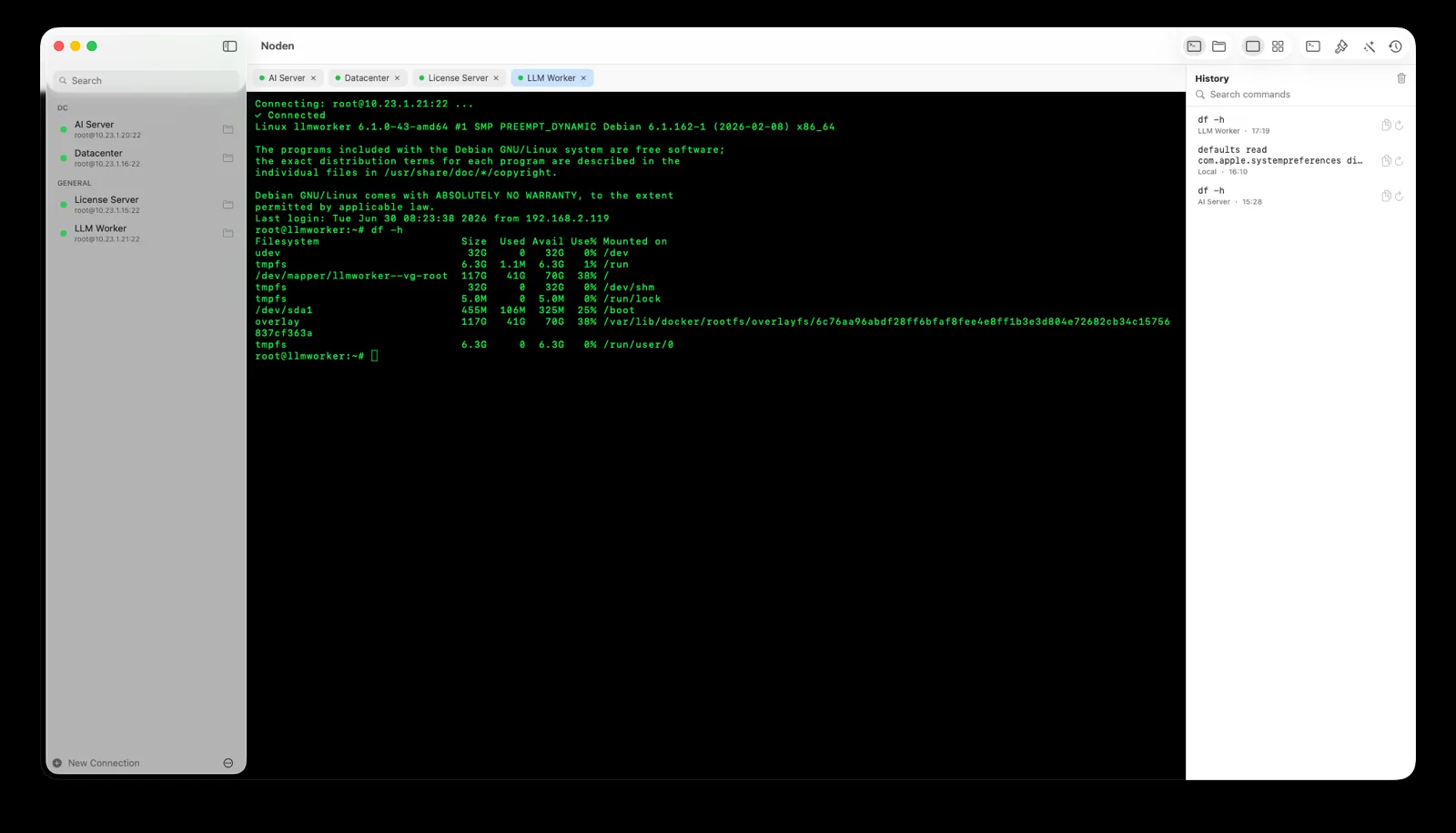
PuTTY is developed as a Windows application. It is technically possible to build it on macOS through X11/Homebrew, but it is not a native Mac experience and most people don't need it. On a Mac you already have the ssh, scp and sftp commands in Terminal.
Three ways to do SSH on a Mac
| Built-in Terminal + ssh | Free and always available. Great for quick, one-off connections. No saved-connection UI or graphical file transfer. |
|---|---|
| PuTTY via X11 (Homebrew) | Possible but clunky and non-native. Rarely worth it on a Mac. |
| Noden (native app) | Saved connections, a grid of live terminals, dual-pane SFTP, searchable history and an optional AI assistant — the PuTTY-style workflow, native to macOS. |
Why Noden feels right on a Mac
Noden imports your ~/.ssh/config and uses your existing Ed25519 and ECDSA keys, storing passwords and passphrases in the macOS Keychain. It's a native SwiftUI app, notarized by Apple, and runs on Apple Silicon and Intel. Terminal and SFTP are free for up to five connections; Pro adds unlimited connections, full history and the AI assistant for $5.99 your first year, then $10.99/year.
When you should stay with PuTTY
- Your daily machine is Windows. PuTTY is the right tool there and Noden has no Windows build — this page is only about the Mac half of a mixed fleet.
- You rely on PuTTY's serial window on Windows hardware. Noden does serial too, but only from a Mac with a USB-to-serial adapter.
- You want a single-binary, zero-install tool you can drop on any machine. Noden is a signed macOS app that lives in /Applications.
What your PuTTY habits map to on a Mac
Most of what you do in PuTTY has a direct equivalent; the difference is that it lives in one window instead of several.
- Saved sessions → saved connections. Host, user, port and key per entry,
grouped, and searchable with ⌘P. Noden also imports the hosts already in your
~/.ssh/config, so an existing setup carries over without retyping. - Keys. Noden uses the OpenSSH keys already in
~/.ssh— Ed25519 and ECDSA — and keeps passphrases in the macOS Keychain rather than in an application file. - The serial connection. If you use PuTTY for console cables, this is the part worth knowing: Noden speaks to a USB-to-serial adapter as a first-class connection, in the same sidebar and the same terminal as SSH. Baud rate, data bits, parity, stop bits and flow control are configurable, with presets taken from vendor documentation — Cisco 9600, FortiGate 9600, Sophos XG and XGS 38400, MikroTik 115200, Aruba CX 115200, Ubiquiti 115200, all 8N1. Serial connections are included in the free version. The device list refreshes while the connection editor is open, so you can plug the adapter in after opening the form.
- Several windows → one grid. One to four columns of live sessions, each with its own latency reading, and broadcast input when the same command has to land on every open tab.
- Files. Where PuTTY hands you off to a separate tool, Noden has a dual-pane SFTP browser in the same window: drag from Finder, open a remote file in your own editor.
- Windows boxes. RDP sessions open as tabs next to the shells, with clipboard and file copy-paste both ways, shared folders and RD Gateway.
Credentials never sit in a config file: passwords, keys, API tokens and notes live in a vault
behind Touch ID, and at a sudo prompt you can right-click and type a password
straight into the terminal without it entering your shell history.
Troubleshooting
Your PuTTY key is a .ppk file
Noden reads the ed25519 and ecdsa keys in ~/.ssh, not PuTTY's own format. Convert the .ppk to an OpenSSH private key first, drop it in ~/.ssh, and it will be picked up without further configuration.
You want your PuTTY saved sessions back
There is no PuTTY session importer. If those servers also live in ~/.ssh/config, Noden imports that file in one step and turns every Host entry into a saved connection.
The host key warning looks different from PuTTY's
That is expected — this is a different SSH implementation (swift-nio-ssh), so the fingerprint prompt is Noden's own, not PuTTY's cache.
Install Noden on macOS
brew install --cask useroamteknoloji/tap/nodenFrequently asked questions
Is there a version of PuTTY for Mac?
There is no official native PuTTY app for macOS. macOS includes the OpenSSH command-line client, and for a graphical experience you can use a native app like Noden.
What is the Mac equivalent of PuTTY?
For quick command-line SSH, use the built-in ssh command. For a PuTTY-style graphical client with saved sessions and file transfers, Noden is a native macOS option.
Is Noden free?
Noden is free for up to five saved connections, including terminal and SFTP. Pro is USD 5.99 your first year, then USD 10.99 per year for unlimited connections, full history and AI.
See also: Serial console for Mac · MobaXterm alternative for Mac · Termius alternative for Mac · iTerm2 for SSH · Royal TSX alternative · Best SSH client for Mac · Mac SSH client guide