iTerm2 & SSH on macOS
iTerm2 for SSH: where Noden helps
iTerm2 is an excellent macOS terminal emulator — but it is not an SSH connection manager. If you manage several servers, Noden adds what a terminal emulator does not: saved SSH connections, a dual-pane SFTP browser, a grid of live terminals, and an optional AI assistant that suggests commands and waits for approval before running them.
Published July 15, 2026 · By Tugay Pala, Useroam Teknoloji
Terminal emulator vs SSH client
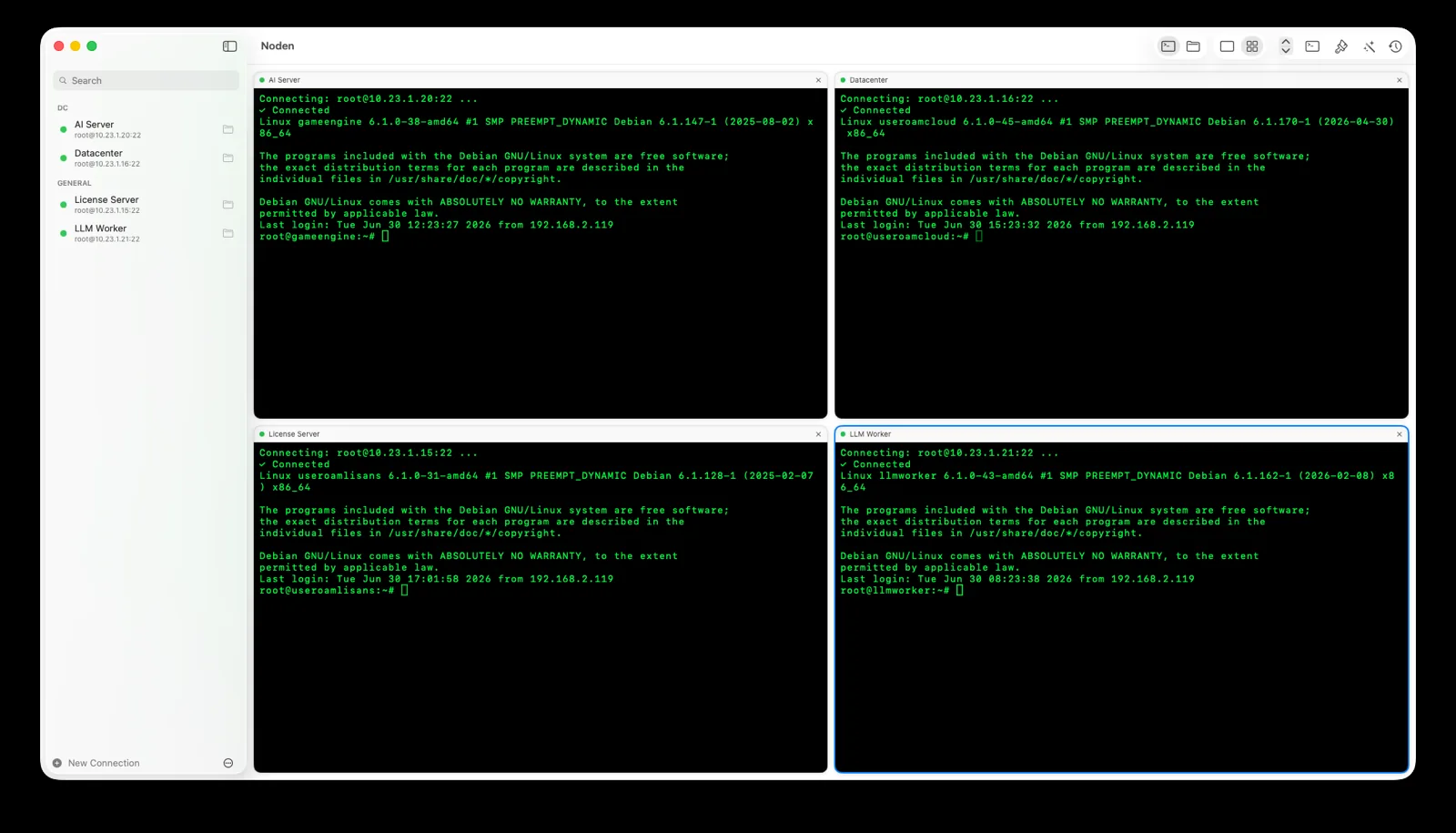
iTerm2 renders your local shell and can run ssh like any command. Noden is built around remote servers: you save connections, open several at once, transfer files graphically, and keep a searchable history per host. They solve different problems, and many people use both.
iTerm2 and Noden at a glance
| Primary role | iTerm2: local terminal emulator Noden: SSH & SFTP client for remote servers |
|---|---|
| Saved connections | Noden manages saved SSH connections with groups; imports ~/.ssh/config and your Ed25519/ECDSA keys. |
| Multiple terminals | Both support tabs/splits. Noden adds a grid view to watch several live sessions side by side. |
| SFTP file transfers | Noden includes a dual-pane graphical SFTP browser with drag-and-drop and remote editing. iTerm2 does not. |
| AI commands | Noden turns plain-English tasks into reviewed shell commands and never runs them without approval. |
| Local shell power | iTerm2 is the stronger choice for a local terminal with deep customization and shell integration. |
How to organise SSH sessions while keeping iTerm2
Most people who search for an iTerm2 connection or session manager are not looking to replace iTerm2 at all — they want their servers organised and one keystroke away. There are three approaches, in increasing order of effort, and the first two cost nothing.
1. ~/.ssh/config — the layer underneath everything
iTerm2 runs the ssh command, and ssh reads
~/.ssh/config. A host block gives you a short alias, the right key, the right user
and a jump host, so ssh web01 replaces a long command. This is the most portable
option: the same file works in Terminal.app, in a script, on another machine, and Noden
imports it rather than asking you to retype it.
Host web01
  HostName 10.0.4.11
  User deploy
  IdentityFile ~/.ssh/id_ed25519
  ProxyJump bastion
2. iTerm2 profiles
iTerm2's profiles can each launch a command, so a profile per server gives you a menu of connections with their own colours and fonts, and dynamic profiles let you generate that list from a JSON file. What profiles do not give you is a view of several live sessions at once, file transfer, or anywhere safe to keep the credentials themselves.
3. A dedicated connection manager
This is where Noden fits, and it is worth being precise about what it adds rather than claiming iTerm2 lacks things it does well:
- Saved connections with groups, imported from
~/.ssh/config, using the Ed25519 and ECDSA keys already in~/.ssh. - ⌘P quick switcher — type a few letters of a host name and you are on it.
- A grid of live sessions, one to four columns, with per-tab latency shown, so you can watch four machines at once instead of cycling tabs.
- Broadcast input — type once, every open tab receives it. Useful when the same command has to land on a whole cluster.
- Jump hosts and port forwarding without editing config by hand: pick a saved connection as the jump host, and a database or admin console behind the bastion opens locally.
- A password vault behind Touch ID — passwords, keys, API tokens and notes
live in the macOS Keychain, never in a plain file. At a
sudoprompt, right-click and choose Type Password from Vault and the secret never enters your shell history. - Dual-pane SFTP in the same window as the shell, with drag-and-drop from Finder and remote files opening in your own editor.
- Windows over RDP and switch console ports over USB-to-serial as connections in the same sidebar — the serial console is in the free version, with vendor baud presets.
- Searchable command history per host, so "what did I run on this box last month" is a search rather than an archaeology project.
And because it is a native Metal-rendered app rather than an Electron shell, it starts like a Mac app. If you like iTerm2's local shell, keep it — ⌘T opens a local terminal inside Noden for the quick things, and the two coexist happily.
When to reach for Noden
Use Noden when you connect to many servers and want saved connections, graphical SFTP in the same window, a grid of terminals and optional AI command help — without gluing separate apps together. Keep iTerm2 for your local shell if you love its customization.
When iTerm2 alone is enough
- You mostly work locally. If remote hosts are occasional, iTerm2 plus the
sshcommand is lighter and already installed. - You have deep iTerm2 customisation — triggers, coprocesses, tmux integration, custom profiles. None of that carries over.
- You do not need file transfers or Windows desktops in the same window. That combination is Noden's reason to exist; without it the overlap with iTerm2 is small.
Troubleshooting
You want your shell profile to look the same
Settings (⌘,) covers the colour theme, monospaced font, cursor style, blink, scrollback size and the bell. Text size adjusts live with ⌘+, ⌘- and ⌘0.
You need a quick local shell
⌘T opens a local terminal on your Mac inside Noden — useful for running scp or editing a file without leaving the app.
You want several servers on screen at once
Switch the toolbar layout from tabs to grid and pick 1–4 columns. Click a cell to give it keyboard focus.
Install Noden on macOS
Install the notarized app directly or with Homebrew. Apple Silicon and Intel, macOS 13 or later.
brew install --cask useroamteknoloji/tap/nodenFrequently asked questions
Is Noden a replacement for iTerm2?
Not exactly. iTerm2 is a terminal emulator for your local shell; Noden is an SSH and SFTP client for managing remote servers. Many people use iTerm2 for local work and Noden for servers.
Does iTerm2 manage SSH connections and SFTP?
iTerm2 has profiles and can run ssh, but it does not provide a graphical SFTP browser or a saved-connection manager. Noden adds saved connections, dual-pane SFTP and a multi-terminal grid.
How do I manage SSH connections in iTerm2?
iTerm2 itself has profiles, and each profile can launch a command such as ssh web01; dynamic profiles let you generate that list from a JSON file. The connection details themselves normally live in ~/.ssh/config, which the ssh command reads. What neither provides is a saved-credential store, a graphical file transfer pane or a grid of live sessions — that is the gap a dedicated connection manager fills.
Does Noden read my existing ~/.ssh/config?
Yes. Noden imports your ~/.ssh/config hosts and uses the Ed25519 and ECDSA keys already in ~/.ssh, so you do not retype anything. Passphrases and passwords are kept in the macOS Keychain rather than in a file.
Is Noden free?
Noden is free for up to five saved connections, including terminal and SFTP. Pro is USD 5.99 your first year, then USD 10.99 per year for unlimited connections, full history and AI.
See also: MobaXterm alternative for Mac · Termius alternative for Mac · Royal TSX alternative for Mac · Mac SSH client guide