RDP client for Mac
Windows remote desktop on your Mac, next to your servers
Noden is a native macOS app that speaks SSH, SFTP and RDP. Since version 1.1 you can open a Windows machine over RDP in the same window — and the same tab strip — as your Linux terminals. It runs on macOS 13 Ventura and later, on both Apple Silicon and Intel.
Published July 19, 2026 · By Tugay Pala, Useroam Teknoloji
Why put RDP in an SSH client?
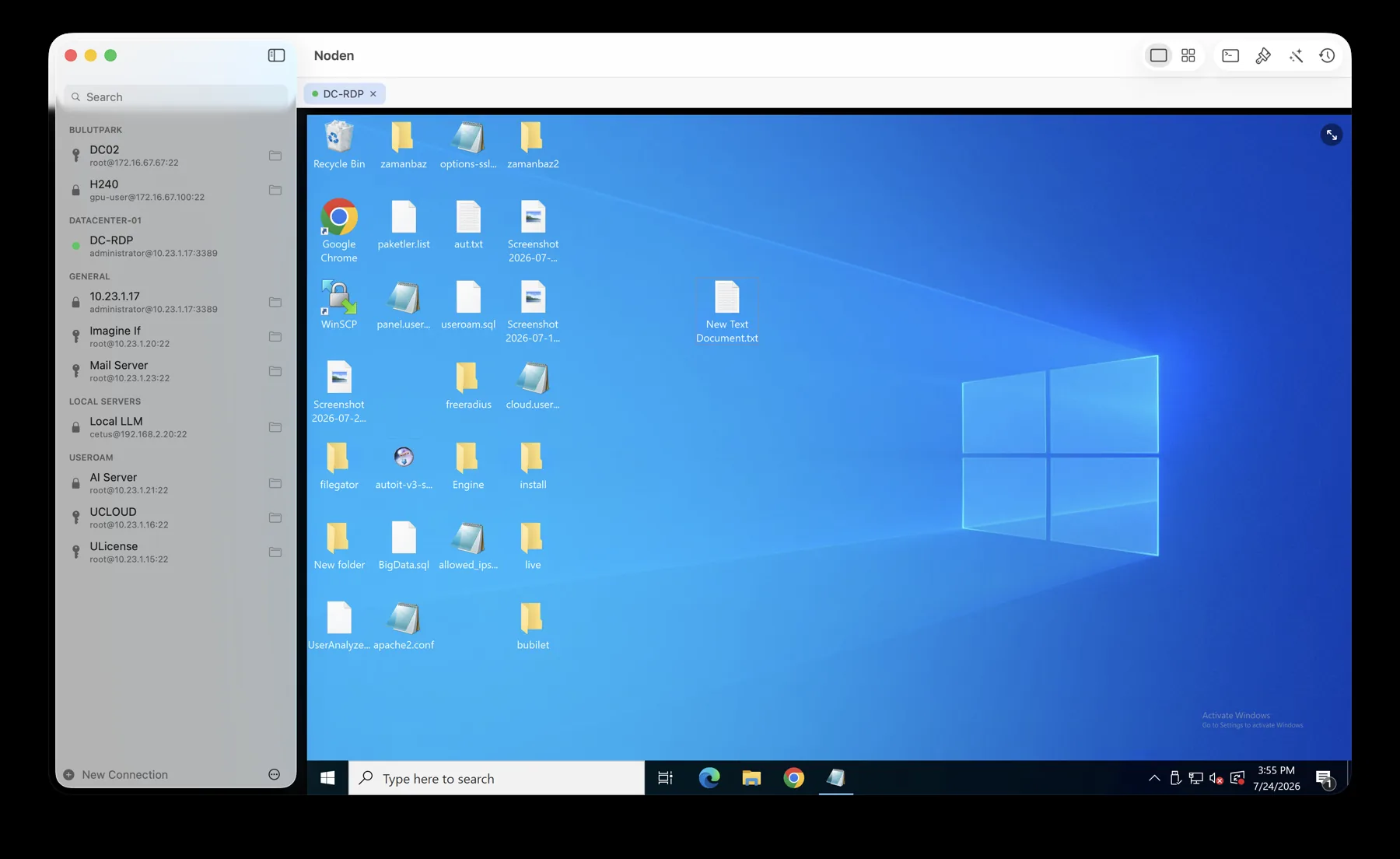
Most infrastructure is mixed. You keep a terminal open for the Linux boxes, a file transfer app for uploads, and a separate remote desktop app for the one Windows server that runs the thing nobody wants to migrate. Noden collapses those three windows into one: saved connections in a single sidebar, sessions in one tab strip, and a grid layout that can show a Windows desktop and three Linux terminals at the same time.
What Noden's RDP client does
- Dynamic resolution. The Windows desktop resolution follows the Noden window as you resize it, using the RDP display-control channel — no black bars, no scrolling around a fixed canvas.
- Clipboard, both directions. Copy text on the Mac and paste it in Windows, or the other way around.
- File copy-paste, both directions. Copy files in Finder and paste them in Windows Explorer; copy files in Windows and paste them on your Mac.
- Shared folders. A folder from your Mac appears inside the Windows session under “This PC”, which is the fastest route for large transfers.
- Keyboard that behaves. ⌘C / ⌘V map to Ctrl+C / Ctrl+V on the remote side, while macOS shortcuts such as ⌘H and ⌘Q still belong to macOS.
- RD Gateway. Reach machines behind a Remote Desktop Gateway, with optional bypass for local addresses.
- Admin / console session for maintenance work, plus colour-depth control if you are on a slow link.
- Auto-reconnect when a session drops, with backoff.
- Credential prompt — ask at connect time, and only save the password to your macOS Keychain if you choose to.
Security
RDP passwords are stored in the macOS Keychain, exactly like SSH credentials, and are never sent to Noden's servers. If you prefer not to store a password at all, enable “Ask for credentials when connecting” and it stays in memory for that session only. Connection backups are encrypted with AES-GCM and a password-derived key.
Noden's RDP at a glance
| Platform | macOS 13 Ventura or later |
|---|---|
| Protocols | SSH, SFTP and RDP in one app |
| Display | Dynamic resolution, full screen, mixed grid with SSH |
| Clipboard | Text and files, both directions |
| File transfer | Clipboard paste or a shared Mac folder inside Windows |
| Networking | RD Gateway, admin/console session, auto-reconnect |
| Credentials | macOS Keychain, or prompt at connect time |
| Price | Free for up to 5 connections; Pro is USD 5.99 first year, then USD 10.99/year |
When Noden is not your remote desktop tool
- You only ever connect to Windows. If there is no SSH or SFTP in your day, a dedicated RDP client is a simpler choice.
- You need VNC or a non-RDP remote desktop protocol. Noden speaks RDP only.
- You are on macOS 12 or older, or not on a Mac at all — Noden needs macOS 13 Ventura or later.
Troubleshooting
The Windows machine refuses the connection
Remote Desktop has to be enabled on the Windows side first. Noden switches the port to 3389 automatically when the connection Protocol is set to RDP.
You reach the server through a gateway
RD Gateway is supported, with bypass for local addresses, admin/console session and colour-depth control.
Copying big files through the clipboard is slow
Share a Mac folder into the session instead. It shows up in Windows under This PC and is the fastest route for large transfers.
The desktop does not fill the window
Dynamic resolution follows the Noden window, so the picture resizes with the tab. The full-screen button sits in the top-right of the RDP view.
Frequently asked
Is this an alternative to Microsoft Remote Desktop for Mac?
For the common workflow, yes: saved Windows connections, full-screen remote desktop, clipboard and file transfer, shared folders and gateway support are all there. The difference is that Noden is not only a remote desktop client — your SSH terminals and SFTP browser live in the same window, which is the point if you administer a mixed fleet.
Is RDP included in the free version?
Yes. The free version allows up to five saved connections of any type, so you can use RDP without buying Pro. Pro removes the connection limit, keeps full command history and adds the AI assistant.
Which Windows versions work?
Any Windows machine with Remote Desktop enabled — Windows 10 and 11 Pro, and Windows Server editions. Connections through a Remote Desktop Gateway are supported.
Download Noden for Mac
Free to start, no account required.
brew install --cask useroamteknoloji/tap/noden
See also: Microsoft Remote Desktop alternative · SSH, SFTP and RDP in one app · Serial console for Mac · macOS SSH client guide · Best SSH client for Mac