SSH · SFTP · RDP for macOS
SSH, SFTP and RDP in one Mac app
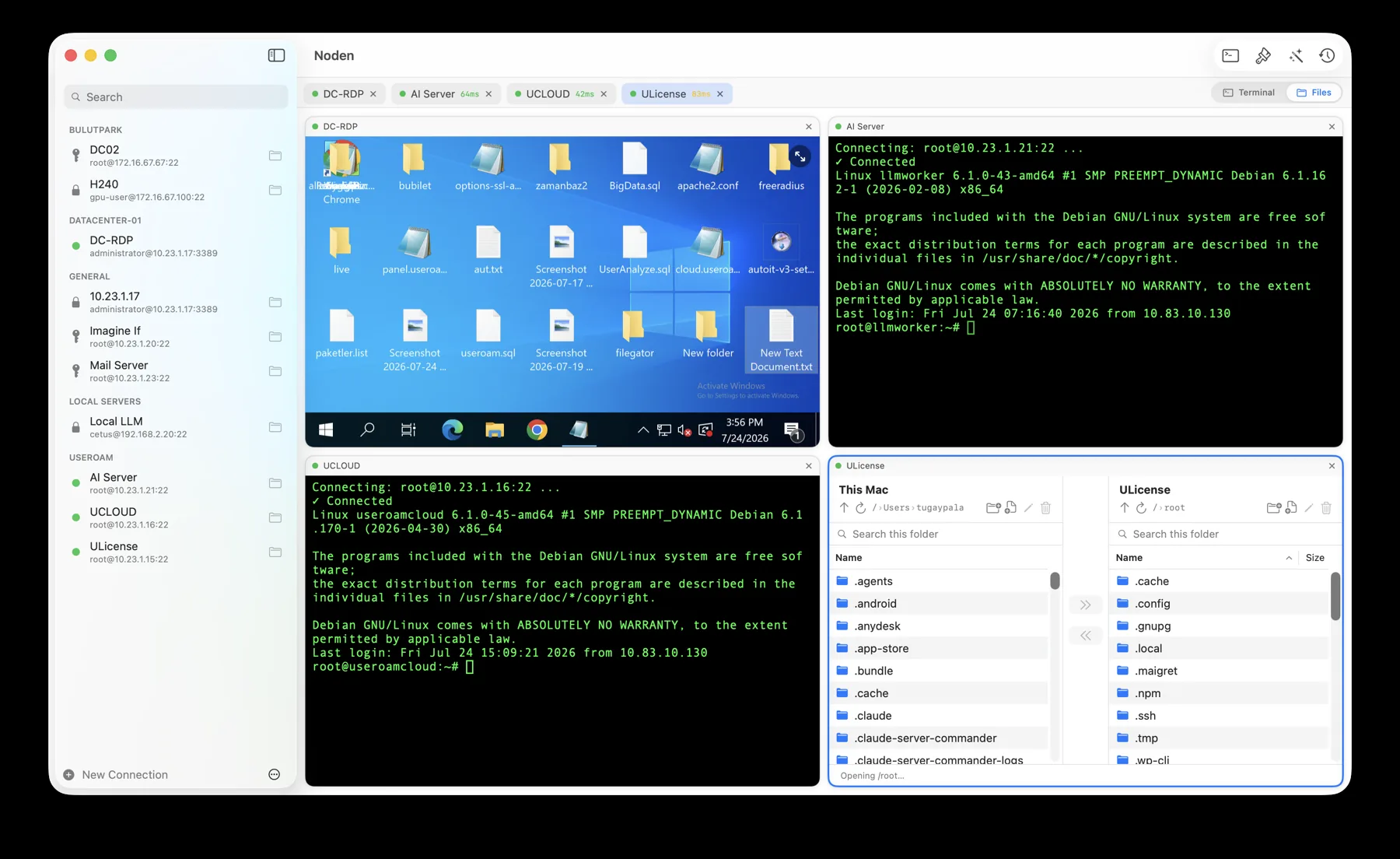
Noden is a native macOS app that runs SSH, SFTP and RDP in a single window. A multi-session terminal, a dual-pane SFTP file manager and a Windows remote desktop open side by side in a resizable grid — so the shell, the files and the desktop of your servers are visible at once, with no window switching.
Published July 28, 2026 · By Tugay Pala, Useroam Teknoloji
What "SSH, SFTP and RDP in one Mac app" means
Managing servers from a Mac usually takes three separate apps: a terminal for SSH, a transfer app for SFTP, and Microsoft Remote Desktop for the Windows machines. "SSH, SFTP and RDP in one app" means a single program that speaks all three protocols, keeps every connection in one place, and — in Noden's case — can put a terminal, a file manager and a Windows desktop on screen together instead of behind separate windows.
Noden vs Terminalus vs SSHive vs Tempest
Several native Mac apps now cover SSH, SFTP and RDP. Here is an honest side-by-side. Each tool has a different focus, and the differences matter more than the checkmarks.
| Noden | Terminalus | SSHive | Tempest | |
|---|---|---|---|---|
| Platforms | macOS 13+ (Apple Silicon & Intel) | macOS, iPadOS | macOS, iPhone, iPad | macOS, iOS, Windows, Android |
| SSH terminal | Yes | Yes | Yes | Yes (+ Mosh) |
| SFTP file manager | Yes — dual-pane | Yes — dual-pane | Yes — dual-pane | Yes |
| RDP (Windows) | Yes — in free tier | Yes | Yes — Pro only | Yes |
| VNC | No | No | Yes | Yes |
| Serial console (USB-to-serial) | Yes — in free tier | No | No | Yes |
| Other protocols | — | — | SSH tunnels (SOCKS5) | Mosh, Kubernetes |
| Side-by-side grid (terminal + files + desktop) | Yes | Tabs | Tabs | Yes (tabs & splits) |
| AI assistant | Yes — proposes commands, you approve; your key or built-in | No | Yes — in-terminal AI with your own key; MCP server for external agents (Pro) | Yes — Storm AI agent (Pro), runs commands |
| Native macOS (no Electron) | Yes (SwiftUI) | Yes (SwiftUI) | Yes | Yes |
| Credentials | macOS Keychain | Local, on device | macOS Keychain | Keychain + zero-knowledge sync |
| Free tier | Up to 5 connections, any type (incl. RDP) | Free with limits (SFTP included) | 2 sessions, 5 profiles; RDP/VNC are Pro | Free on a single device |
| Price | USD 5.99 first year, then USD 10.99/year | USD 1.99/mo (~USD 24/yr) | USD 9.99 one-time (universal) | USD 7.99/mo or 199.99 lifetime |
| Credential vault | Noden: macOS Keychain, device-only, unlocked by Touch ID; no account and no sync. SSHive: macOS Keychain, no sync. Tempest: zero-knowledge encrypted vault that syncs across platforms. Terminalus: local, on device. Source: credential storage compared, read from each vendor's own documentation. |
Competitor details from their public sites and App Store listings, July 2026; features and prices change, so check the source before deciding.
Which one fits you
Terminalus is the closest match — also native (macOS and iPadOS) with SSH, SFTP and RDP in one window. It's a newer app on a subscription (about USD 24 a year) and, as of now, has no VNC, no serial and no AI helper. Pick SSHive or Tempest if you need VNC or an iPhone app — both run on iPhone and iPad and add VNC; Tempest goes further for platform engineers with Mosh, Kubernetes, serial, real-time collaboration and encrypted cross-device sync, on a subscription.
Pick Noden if your day is SSH, SFTP and RDP on a Mac and you want them side by side in one window, an SFTP commander that behaves like a real file manager, and an AI assistant that proposes a shell command and waits for you to approve it — for USD 5.99 the first year, then a flat USD 10.99 a year, the cheapest here, with RDP and serial included even in the free tier. Noden is deliberately macOS-only and skips VNC to keep that focus.
How Noden does it
- One window, one tab strip. SSH, SFTP, RDP and serial sessions share the same sidebar and tabs; a grid layout can show a Windows desktop and three Linux terminals at once.
- Real dual-pane file manager. Local and remote side by side, resizable and sortable columns, drag from Finder, Quick Look, and remote file editing that syncs back on save.
- RDP that fits the window. Dynamic resolution, clipboard and file copy-paste both ways, a shared Mac folder inside Windows, and RD Gateway.
- OS-aware AI. On Linux it writes the shell command and only runs it after you approve; on Windows it answers as a chat. Use the built-in provider or your own key (OpenAI, Claude, Groq, local).
- Quiet by default. Credentials stay in the macOS Keychain, file contents are never collected, and there is no account to create.
Noden at a glance
| Platform | macOS 13 Ventura or later (Apple Silicon and Intel) |
|---|---|
| Protocols | SSH, SFTP, RDP and serial in one app |
| Layout | Tabs or a resizable grid; terminal, files and desktop side by side |
| Files | Dual-pane SFTP commander with drag-and-drop and remote editing |
| AI | Optional assistant that proposes commands you approve; bring your own key |
| Privacy | Credentials in macOS Keychain; no account; file contents never collected |
| Price | Free for up to 5 connections; Pro is USD 5.99 first year, then USD 10.99/year |
Frequently asked
Is there a Mac app with SSH, SFTP and RDP in one place?
Yes. Noden combines an SSH terminal, a dual-pane SFTP file manager and a Windows RDP desktop in one native macOS window, and can show them side by side. Terminalus, SSHive and Tempest also cover these protocols on the Mac.
Does Noden include RDP for free?
Yes. The free tier allows up to five saved connections of any type, including RDP, so you can use Windows remote desktop without buying Pro. In SSHive, RDP is a Pro feature.
Does Noden support VNC?
No. Noden focuses on SSH, SFTP, RDP and serial console. If you also need VNC, SSHive and Tempest include it on the Mac.
Is it native, or Electron?
Noden is a native macOS app built with SwiftUI and AppKit — no Electron. SSH and SFTP are built on Apple's swift-nio-ssh; the RDP surface is drawn with Metal.
When one window is not worth it
- You only use one of the three. The whole argument here is that a terminal, a file manager and a Windows desktop share a window — if you only need SSH, that is a smaller benefit.
- Your team needs shared credentials now. Noden Team is announced but not yet on sale.
- You work across Windows or Linux desktops. Noden is macOS 13+ only, so a mixed-desktop team would be split across two tools.
Troubleshooting
You want them genuinely side by side, not just as tabs
Switch the toolbar layout from tabs to grid and choose 1–4 columns. RDP sessions can share that grid with SSH sessions.
Switching a session between shell and files
The Terminal / Files selector in the toolbar flips any SSH session into the dual-pane browser and back.
Everything is in one window and you wanted two
The file commander pops out into a separate window, and an RDP session can go full screen from the button in its top-right corner.
Download Noden for Mac
Free to start, no account required.
brew install --cask useroamteknoloji/tap/noden
See also: Serial console for Mac SSH to old switches · RDP client for Mac · Mac SFTP client · macOS SSH client guide · Best SSH client for Mac · AI SSH client