AI + SSH on macOS
An AI SSH client for macOS
Noden is a native macOS SSH client with a built-in AI assistant. Instead of remembering exact flags, you describe what you want — "show the largest files in /var", "restart nginx and show its status" — and Noden proposes the shell command. Nothing runs until you approve it, and risky commands ask again.
Published July 16, 2026 · By Tugay Pala, Useroam Teknoloji
How the AI assistant works
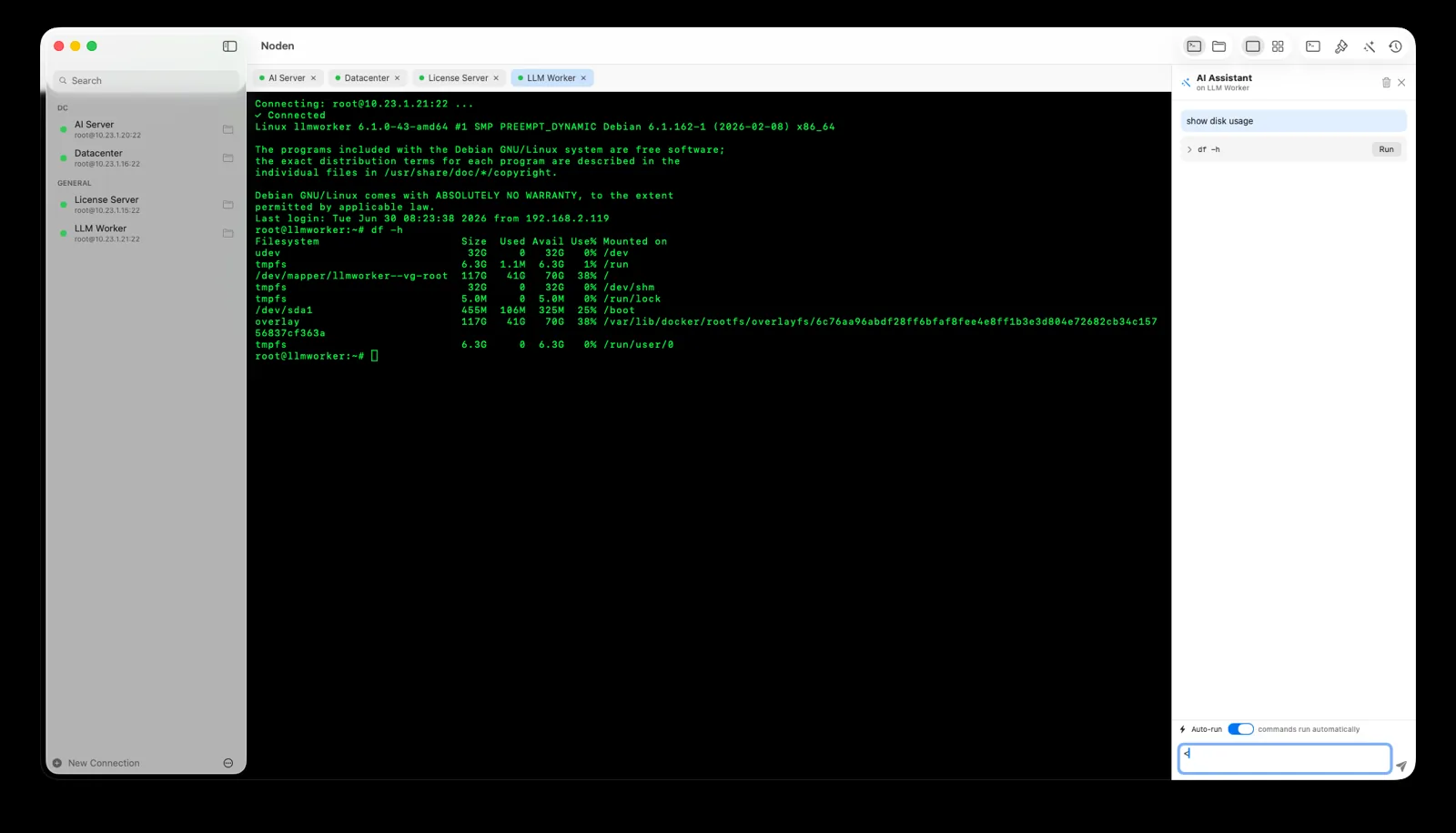
| 1. Describe | Type the task in plain English in the AI panel next to your terminal. |
|---|---|
| 2. Review | Noden suggests one or more commands; you see exactly what will run. |
| 3. Approve | You run a command with a click. Potentially destructive commands prompt for confirmation. |
| 4. Learn | Each connection keeps a searchable history so you can reuse commands later. |
Safe by design
The assistant is a helper, not an autopilot. It never executes unreviewed commands, which matters when you're working on production servers. You stay in control of every action.
More than AI
Noden is also a complete SSH and SFTP client: saved connections, a grid of live terminals, a dual-pane SFTP browser with drag-and-drop and remote editing, and macOS Keychain security. It's native SwiftUI, notarized, Apple Silicon and Intel. Free for up to five connections; the AI assistant is part of Pro — $5.99 your first year, then $10.99/year.
When the AI assistant is not for you
- No AI is allowed to see your infrastructure. The assistant is optional and Pro-only — the terminal, SFTP, RDP and serial console all work without it.
- You want an agent that acts on its own. Noden proposes commands and waits; it will not execute a plan unattended.
- You need it on the free tier. Free keeps the terminal, file manager, RDP, serial console and the last 50 commands, but not the assistant.
Troubleshooting
The assistant is greyed out
It is a Pro feature. Pro is USD 5.99 your first year, then USD 10.99 per year and also removes the five-connection limit and the 50-command history cap.
You want to use your own model or key
Add a key for OpenAI, Groq or OpenRouter, or point it at a local model. Noden's SSH-aware reasoning applies either way.
You are worried a suggested command will just run
It will not. Commands are always shown first, dangerous operations are flagged, and nothing executes until you click Run.
You are connected to a Windows machine
On Windows the assistant drops shell-command generation and answers as a chat instead.
Install Noden on macOS
brew install --cask useroamteknoloji/tap/nodenFrequently asked questions
What is an AI SSH client?
It lets you describe a server task in plain language and suggests the shell command. Noden proposes commands and waits for your approval before running anything.
Does the AI run commands automatically?
No. Nothing runs without your approval; dangerous commands prompt again.
Can I use my own AI provider?
Yes — Noden's assistant or an OpenAI-compatible provider (OpenAI, Groq, OpenRouter, or a local model).
See also: Best SSH client for Mac · Mac SSH client guide · MobaXterm alternative · Termius alternative