MobaXterm alternative for macOS
A native MobaXterm alternative for Mac
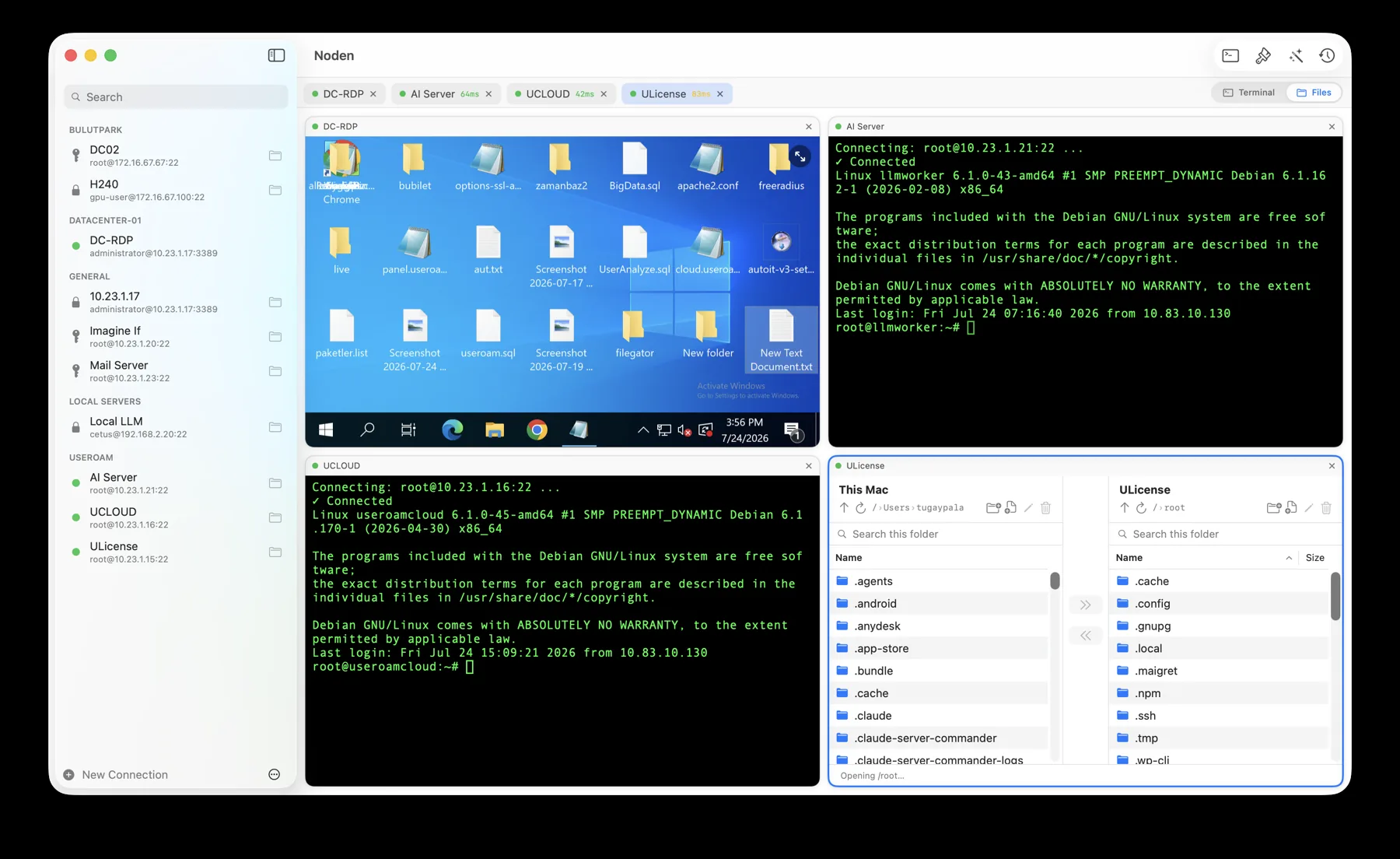
Noden is a native macOS SSH and SFTP client for people looking for the core MobaXterm workflow on a Mac: saved server connections, multiple terminals and graphical file transfers in one window. It also includes an optional AI assistant that proposes shell commands and waits for your approval before running them.
Published July 15, 2026 · By Tugay Pala, Useroam Teknoloji
Does MobaXterm run on macOS?
MobaXterm's official documentation describes it as a Windows application that combines remote tools such as SSH, SFTP, RDP, VNC and X11. Noden is not a port of MobaXterm; it is a separate app designed specifically for macOS 13 Ventura and later.
Noden and MobaXterm at a glance
| Platform | Noden: native macOS app MobaXterm: Windows app |
|---|---|
| SSH sessions | Both support saved SSH sessions and multiple terminal views. |
| File transfers | Both provide graphical SFTP browsing and drag-and-drop transfers. |
| Remote file editing | Noden can open a remote file in a Mac editor and upload saved changes back to the server. |
| AI commands | Noden can turn plain-English tasks into reviewed shell command suggestions. |
| RDP, VNC and X11 | MobaXterm includes all three. Noden has a built-in RDP client (since 1.1) and adds a serial console MobaXterm has no equivalent for on the Mac, but it has no VNC client and no X11 server — use a dedicated macOS tool or XQuartz for those. |
| Credentials | Noden stores passwords and key passphrases in macOS Keychain. |
When is Noden a good fit?
Choose Noden when your daily work is primarily SSH terminal access and SFTP file management, you want a native Mac interface, or you want optional command assistance without automatically executing unreviewed commands. It imports hosts from ~/.ssh/config and uses existing Ed25519 and ECDSA keys from ~/.ssh.
When is Noden not a replacement?
Noden covers RDP and serial console as well — a Windows desktop in a tab, and a switch or router console port over a USB-to-serial adapter. But if you depend on MobaXterm's VNC, X11 server or bundled Windows network utilities, Noden is not a complete replacement. Use dedicated macOS tools for those.
Troubleshooting
You are looking for the X11 server
There is none. Noden covers SSH, SFTP, RDP and serial console; for X forwarding on a Mac you still need XQuartz.
You want the sessions and the file browser side by side
That is the default: the toolbar's Terminal / Files switch turns any SSH session into a dual-pane file manager, and the file commander can be popped into its own window.
You need console access to a switch or firewall
Plug in a USB-to-serial adapter — the device list refreshes while the connection editor is open, and there are baud presets taken from vendor documentation.
Install Noden on macOS
Install the notarized app directly or with Homebrew. Noden works on Apple Silicon and Intel Macs.
brew install --cask useroamteknoloji/tap/nodenFrequently asked questions
Is there a native version of MobaXterm for Mac?
MobaXterm's official product is a Windows application. Noden offers a native macOS workflow for SSH terminals and SFTP transfers, but it is a separate product and does not include every MobaXterm protocol.
Can Noden transfer files over SSH?
Yes. Noden includes a dual-pane SFTP file manager with drag-and-drop upload and download.
Is Noden free?
Yes. The free version supports up to five saved connections and includes the terminal and SFTP commander. Pro adds unlimited connections, full history and the AI assistant for USD 5.99 your first year, then USD 10.99 per year.
See also: Serial console for Mac · Termius alternative for Mac · iTerm2 for SSH · Royal TSX alternative for Mac · Mac SSH client guide