WinSCP on macOS
WinSCP for Mac? Here's the native option
WinSCP is a Windows-only SFTP and SCP client — there is no Mac version. If you moved to a Mac and miss WinSCP's two-panel file transfer workflow, Noden gives you the same idea, natively: a dual-pane SFTP browser with drag-and-drop, remote file editing, and a built-in SSH terminal so you don't need a separate app for commands.
Published July 16, 2026 · By Tugay Pala, Useroam Teknoloji
Does WinSCP run on macOS?
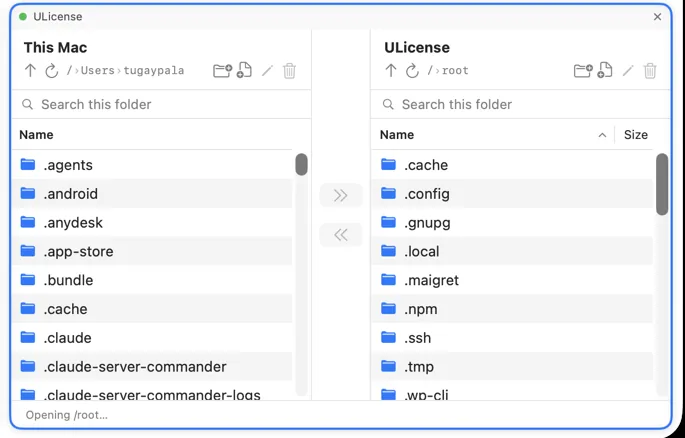
No. WinSCP is built for Windows. You could run it through a virtual machine or Wine, but that's heavy and non-native. On a Mac, a purpose-built app is a far better experience.
WinSCP and Noden at a glance
| Platform | WinSCP: Windows only Noden: native macOS app |
|---|---|
| Two-panel transfers | Both use a dual-pane layout. Noden shows local and remote side by side with drag-and-drop upload and download. |
| Remote editing | Noden opens a remote file in a Mac editor and uploads your changes back automatically. |
| Built-in terminal | Noden includes a full SSH terminal in the same window, plus a grid for multiple sessions. |
| Protocols | Noden focuses on SSH and SFTP. For SCP/FTP-heavy or Windows-specific needs, WinSCP on Windows remains an option. |
| Keys & security | Noden uses your ~/.ssh keys and stores secrets in the macOS Keychain. |
Why Noden feels natural on a Mac
Noden is a native SwiftUI app, notarized by Apple, running on Apple Silicon and Intel. It imports ~/.ssh/config and your existing Ed25519/ECDSA keys. SFTP and the terminal are free for up to five connections; Pro adds unlimited connections, full history and an optional AI assistant for $5.99 your first year, then $10.99/year.
When WinSCP is still the answer
- You need FTP or FTPS. WinSCP speaks both; Noden transfers files over SFTP inside an SSH session and nothing else.
- You depend on WinSCP's scripting and .NET assembly for unattended jobs. Noden is an interactive app, not an automation runtime.
- You are staying on Windows. There is no Windows build of Noden.
Coming from WinSCP: the parts that matter day to day
WinSCP users tend to want three things on a Mac: the two-pane layout, keyboard-driven transfers, and somewhere safe for credentials. Here is how each one works in Noden.
- Dual-pane, local on the left, remote on the right. Drag straight from Finder into the remote pane. A remote file opens in whatever editor you already use, and saving it sends it back.
- Saved sites → saved connections with groups, imported from
~/.ssh/configand using the Ed25519 or ECDSA keys already in~/.ssh. - A shell in the same window. The file manager and the terminal for the same
server sit side by side, so you can fix a permission and re-upload without switching apps.
⌘T opens a local terminal on your own Mac for the
scp-style jobs. - Credentials in the macOS Keychain, not in an application configuration file — with a vault for passwords, SSH keys, API tokens and secure notes, every read gated by Touch ID and a grace window you choose (every time, 5 minutes or 30). Copied secrets clear from the clipboard after 30 seconds.
- Getting to machines you cannot reach directly. Pick a saved connection as a jump host and Noden goes through it; local port forwarding comes with it, so a database or admin console behind the bastion opens on your Mac.
- The Windows servers you still administer. RDP is built in — clipboard and file copy-paste both ways, shared folders, RD Gateway — as a tab beside the shells.
Troubleshooting
You are looking for the Site Manager
Connections live in the left sidebar. Each one stores host, port, username and authentication, and a connection can be edited at any time from the sidebar.
Your edits to a remote file are not saved back
Use Edit in place — Noden opens the remote file in your Mac editor and uploads it automatically when you save. Opening a downloaded copy instead will not sync anything.
A large directory transfer needs to be stopped
The transfer panel runs concurrent transfers with progress, and the cancel button stops one immediately.
Install Noden on macOS
brew install --cask useroamteknoloji/tap/nodenFrequently asked questions
Is there a version of WinSCP for Mac?
WinSCP is Windows-only. On macOS, Noden provides a dual-pane SFTP file manager with drag-and-drop, remote editing and a built-in SSH terminal.
What is the Mac equivalent of WinSCP?
Noden is a native macOS SFTP and SSH client with a two-panel file browser, similar to the WinSCP workflow, plus a terminal in the same window.
Is Noden free?
Noden is free for up to five saved connections, including SFTP and terminal. Pro is USD 5.99 your first year, then USD 10.99 per year for unlimited connections, full history and AI.
See also: Mac SFTP client · FileZilla alternative for Mac · Best SSH client for Mac · How to use SFTP on Mac